
Conversational AI Advanced Settings Guide
Introduction
NSPECT Conversational AI allows your Spark to have natural conversations with callers using voice AI. In most cases, the default settings work extremely well and should not need to be changed.
This guide explains what each setting does, when you might want to adjust it, and what impact those changes will have on the caller experience.
Our recommendation: Start with the default settings and only make changes if you notice a specific issue.
Quick Start Recommended Settings
For most phone-based Sparks:
|
Setting |
Recommended Value |
| Voice | Alloy (Default) |
| Temperature | 0.8 |
| Detection Mode | server_vad |
| Allow Interruptions | Off |
| Threshold | 0.85 |
| Silence Duration | 900 ms |
| Prefix Padding | 500 ms |
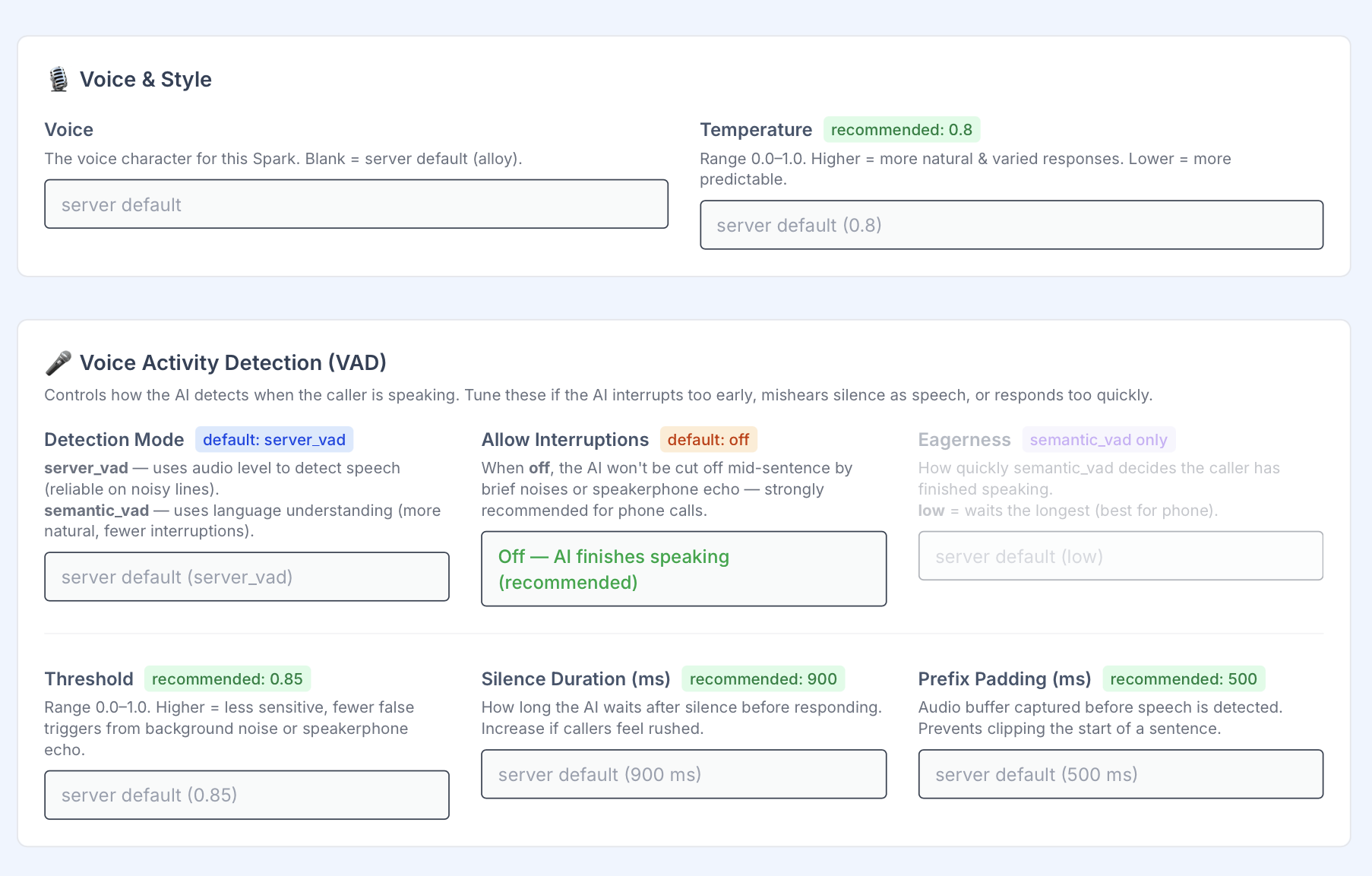
These settings provide the best balance of reliability, call quality, and natural conversation for most users.
Voice
What it does
Voice determines how the AI sounds when speaking to callers.
When to change it
You may want to experiment with different voices to better match your company brand or audience.
Example
A utility company may prefer a professional voice, while a customer service Spark may benefit from a warmer, friendlier voice.
Recommendation
Leave blank to use the system default voice (Alloy).
Temperature
Recommended Value: 0.8
What it does
Temperature controls how creative and varied the AI’s responses are.
Think of it as a personality slider.
- Lower values = More consistent and predictable
- Higher values = More conversational and natural
When to increase it
Increase the temperature if conversations feel robotic or repetitive.
When to decrease it
Decrease the temperature if the AI starts giving overly creative answers or becomes inconsistent.
Examples
Temperature 0.3
- Very consistent
- More scripted
- Good for compliance-driven workflows
Temperature 0.8
- Natural conversation
- Friendly responses
- Recommended for most Sparks
Temperature 1.0
- Most creative
- Highest variation
- Can occasionally be less predictable
Recommendation
Use 0.8 for most conversational experiences.
Detection Mode
Recommended Value: server_vad
What it does
Detection Mode determines how the AI decides when a caller has finished speaking.
You can think of it as the AI’s “listening style.”
server_vad
Best For
- Phone calls
- Noisy environments
- Speakerphones
- General use
How it works
The AI listens to audio volume levels and pauses to determine when someone has finished talking.
Benefits
- Extremely reliable
- Works well with poor phone connections
- Handles background noise better
Recommendation
This is the best option for most Sparks.
semantic_vad
Best For
- High-quality audio
- Advanced conversational experiences
How it works
The AI uses language understanding to determine when someone has completed a thought.
Benefits
- More natural conversations
- Fewer interruptions
- Better flow when callers pause briefly
Considerations
May be less reliable in noisy environments or poor phone connections.
Allow Interruptions
Recommended Value: Off
What it does
Controls whether callers can interrupt the AI while it is speaking.
Off (Recommended)
The AI finishes its sentence before listening again.
Benefits
- Prevents accidental interruptions
- Reduces issues caused by speakerphone echo
- More stable phone call experience
Best For
Nearly all phone-based Sparks.
On
Callers can begin speaking while the AI is talking.
Benefits
- Faster conversations
- More human-like interaction
Risks
- Background noise may accidentally interrupt the AI
- Speakerphone echo can cause unwanted interruptions
Recommendation
Leave Off unless you have a specific reason to allow interruptions.
Eagerness
Only Available When Using semantic_vad
What it does
Controls how quickly the AI decides that a caller has finished speaking.
Think of it as the AI’s patience level.
Low
The AI waits longer before responding.
Benefits
- Fewer interruptions
- Better for phone calls
Best For
Most users.
Medium
Balanced waiting time.
Best For
General conversations.
High
The AI responds very quickly.
Benefits
- Faster conversations
Risks
- May interrupt callers who pause while thinking
Recommendation
Use Low for phone-based Sparks.
Threshold
Recommended Value: 0.85
What it does
Controls how sensitive the AI is to sound.
Higher Values
Examples: 0.85–1.0
Benefits
- Ignores more background noise
- Fewer false activations
- Better for noisy environments
Tradeoff
May miss very quiet speakers.
Lower Values
Examples: 0.50–0.70
Benefits
- Picks up quieter voices
Tradeoff
More likely to react to background sounds.
Recommendation
Use 0.85 unless callers are speaking unusually softly.
Silence Duration
Recommended Value: 900 ms
What it does
Controls how long the AI waits after a caller stops speaking before responding.
Longer Values
Examples: 1200–1500 ms
Benefits
- Gives callers more time to think
- Reduces interruptions
Best For
Older callers, complex questions, or slower conversations.
Shorter Values
Examples: 500–700 ms
Benefits
- Faster conversations
Risks
- May feel rushed
- Can interrupt callers who pause briefly
Recommendation
900 ms works well for most phone conversations.
Prefix Padding
Recommended Value: 500 ms
What it does
Captures a small amount of audio before speech is detected.
This helps prevent the beginning of a sentence from being cut off.
Example
Without enough padding:
“…need help with my account.”
Instead of:
“I need help with my account.”
When to increase it
If callers report that the AI is missing the first word or two of what they say.
Recommendation
Leave at 500 ms unless directed by NSPECT support.
Troubleshooting Guide
The AI is interrupting callers
Try:
- Increase Silence Duration
- Use server_vad
- Set Eagerness to Low
- Turn Allow Interruptions Off
The AI takes too long to respond
Try:
- Reduce Silence Duration
- Increase Eagerness (semantic_vad only)
Background noise is causing problems
Try:
- Increase Threshold
- Use server_vad
- Turn Allow Interruptions Off
The AI sounds robotic
Try:
- Increase Temperature slightly
- Test a different Voice
Final Recommendation
For 95% of Sparks, these settings provide the best caller experience:
- Voice: Alloy (Default)
- Temperature: 0.8
- Detection Mode: server_vad
- Allow Interruptions: Off
- Threshold: 0.85
- Silence Duration: 900 ms
- Prefix Padding: 500 ms
If you’re unsure, start with the defaults and make small adjustments one setting at a time so you can clearly hear the impact of each change.