
How to Request a 3D Scan of a Property
Requesting a 3D scan through NSPECT is simple and only takes a few minutes. This article will walk you through how to submit a scan request and what happens after the request is sent.
Step 1: Log In to NSPECT
Log in to your NSPECT account using your normal username and password.
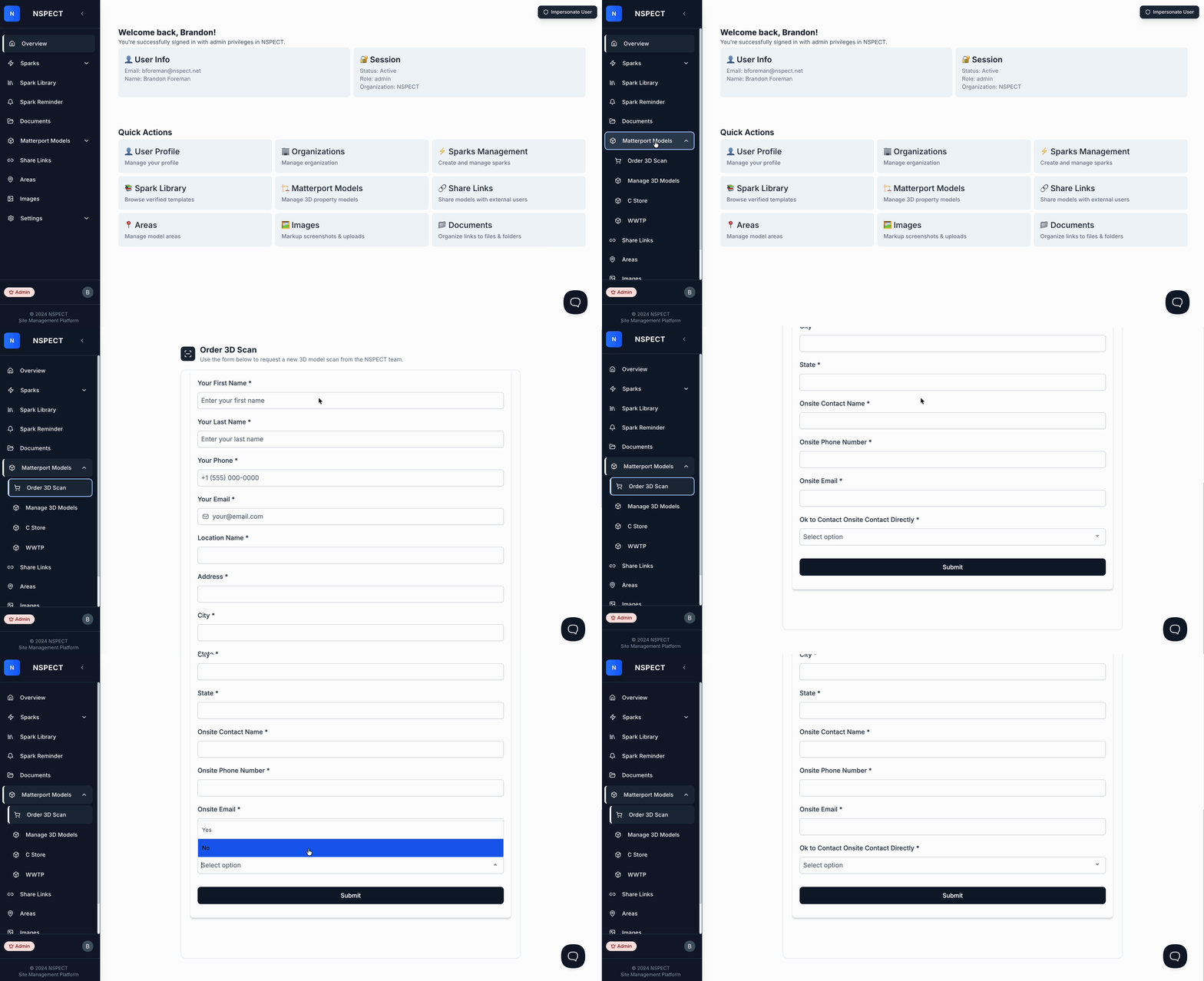
Step 2: Go to Matterport Models
Once you are logged in, look at the left-hand menu and select Matterport Models.
Step 3: Select Order 3D Scan
Under the Matterport Models section, click Order 3D Scan.
This will open a request form in the center of the page.
Step 4: Complete the Scan Request Form
Fill out the form with the property and contact details needed for the scan request.
Please make sure to include any important notes that may help our team, including:
- The property address
- The best contact person for the location
- Any special access instructions
- Preferred scheduling details, if available
- Whether NSPECT is allowed to contact the location directly on your behalf
It is important to clearly note whether our team has permission to contact the property, tenant, manager, or location contact directly. This helps us move the scheduling process forward faster and avoids any delays.
See the animated example below for a quick walkthrough of the process.
What Happens After You Submit the Request
Once the form is submitted, the NSPECT team will review the information provided.
From there, one of the following will happen:
If additional information is needed, our team will contact you.
If we are approved to contact the location directly, our team may reach out to the location contact to confirm access, timing, and any property-specific details.
If a quote is required, we will prepare and send a quote for review and approval.
If your scan is covered under an existing Master Service Agreement, we will assign the request to that agreement and move it into the scheduling process.
Approval and Scheduling
Once any required quote is approved, or the request is confirmed under your Master Service Agreement, our team will schedule the 3D scan to be completed.
After the scan is completed, the model will be processed and added to your NSPECT account once it is ready.
Need Help?
If you have questions before submitting a scan request, or if you are unsure what information to include, please contact the NSPECT team and we will be happy to help.